 Ultimate guide
How to Store Sensitive Legacy Documents Safely
Last Updated: November 4, 2026
Quick Summary
Store sensitive legacy documents by sorting them into three sensitivity tiers, keeping a master inventory of what exists and who can access it, and holding both an encrypted local copy and an encrypted off-site copy. Keep irreplaceable originals in a fireproof and waterproof safe, and shred anything containing personally identifiable information once it is no longer useful.
- The 3-2-1 backup rule means keeping three separate copies of important data: the original and two backups.
- Scan text at 300-600 dpi and save a lossless master alongside a smaller access copy.
- Digitize for backup, not replacement, because notarized, recorded, or court-filed papers are hard to re-create.
- Schedule a migration review every three to five years to confirm files still read and copy the archive forward.
- Use cross-cut shredding, not tearing or a strip-cut shredder that leaves readable strips.
Table of Contents
- Why Legacy Document Storage Deserves a Real Plan
- How to Organize Family Legacy Documents by Sensitivity
- Creating a Legacy Document Inventory Your Family Can Follow
- Digital vs Physical Storage for Legacy Documents
- How Long to Keep Sensitive Personal Records (and What to Shred)
- Locking Down Access: Encryption, Safes, and Least Privilege
- Sharing Your Legacy Plan With the People Who Need It
- Frequently Asked Questions
Why Legacy Document Storage Deserves a Real Plan
The 3-2-1 backup rule, a long-standing standard for data management documented by the National Center for Biotechnology Information, holds that you keep three separate copies of important data: the original and two backups. Most families keep zero. That gap is exactly why best practices for storing sensitive legacy documents matter more than most people realize until a crisis forces the issue.
At My Living Legacy Course, we work with families passing down life stories, final wishes, and the paperwork that supports both.
A will locked in a drawer is not a plan. A folder of birth certificates on a shelf is not a system.
Below, we walk through how to classify, inventory, store, and share these records so your family is not left guessing.
How to Organize Family Legacy Documents by Sensitivity
Sort every document into one of three sensitivity tiers before you decide where it lives. That single step prevents most storage mistakes, because a birth certificate and a personal letter should not share the same drawer, let alone the same level of access.
- Tier 1, high sensitivity: Social Security numbers, account numbers, medical records, and anything containing personally identifiable information. The NIST framework for protecting PII treats this category as requiring risk-based controls, not casual handling.
- Tier 2, medium sensitivity: Deeds, insurance policies, and legal paperwork that is not secret but is hard to replace.
- Tier 3, low sensitivity: Letters, photographs, and story recordings meant to be shared widely.
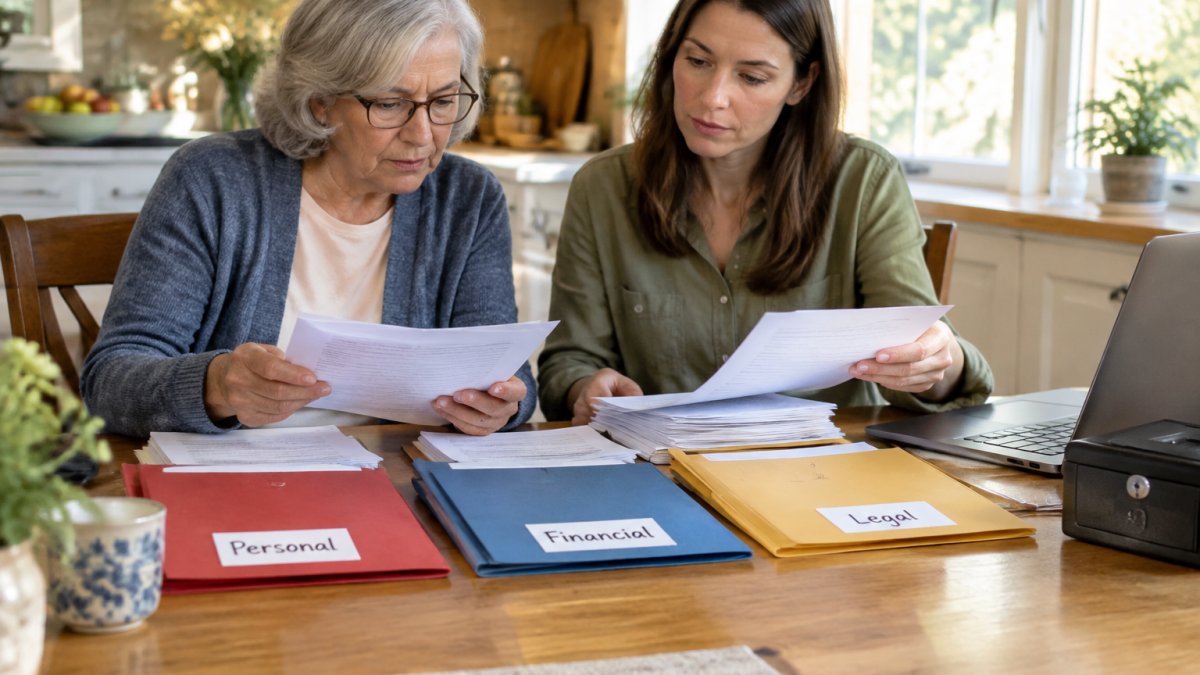
For a practical system that handles the harder case of aging parents, see our guide on organizing important documents for aging parents.
Creating a Legacy Document Inventory Your Family Can Follow
A legacy document inventory is a single master list recording what each document is, where it is stored, and who can access it. Without it, even a well-organized archive becomes a scavenger hunt.
Build the inventory as a spreadsheet or a printed table with these columns:
| Column | What to Record |
|---|---|
| Document name | Will, deed, insurance policy, birth certificate |
| Sensitivity tier | Tier 1, 2, or 3 |
| Physical location | Safe, filing cabinet, attorney's office |
| Digital location | Encrypted drive, cloud folder, USB copy |
| Access holder | Who holds the key, password, or combination |
Keep one copy of the inventory with your will and one with a trusted person, and update it annually, a stale inventory sends people looking in the wrong place. Our guide on how to update legacy documents every year covers a simple annual review routine.
Digital vs Physical Storage for Legacy Documents
You need both, and the split should follow sensitivity. Digital copies protect against fire and flood; physical originals protect against account lockouts, drive failures, and format changes. The real work is the workflow that moves a physical document into a trustworthy digital copy without destroying the original, and planning for the slow decay of whatever medium holds that copy.
A legacy-specific digitization workflow
Most digitization advice targets offices scanning active paper. Legacy documents are often fragile, sometimes legally recorded, and frequently irreplaceable. A workable sequence:
- Inventory before you scan. Work document by document from the master inventory; scanning without one produces a folder of unnamed files nobody can match back to the originals.
- Capture at archival quality. Scan text at 300-600 dpi and photographs higher, saving a lossless master alongside a smaller access copy. PDF/A is the ISO-standardized archival PDF profile; a phone photo of a deed is not a substitute.
- Name and tag every file with the document name, sensitivity tier, and date from the inventory, and store the inventory with the archive.
- Verify the scan before you file it. Confirm all pages are present and legible and that signatures and seals reproduced, a blurry scan discovered ten years later creates false confidence.
- Store the master in two encrypted locations, one local, one off-site, and keep the access copy wherever the family can reach it.
- Keep the original. Digitize for backup, not replacement.
Watch out: scanning everything and shredding the originals is a common and sometimes irreversible mistake. Certain notarized, recorded, or court-filed papers are hard or impossible to re-create, and some institutions will not accept a scan where an original is required.
Long-term media degradation is the risk nobody plans for
A file saved is not a file preserved. Every storage medium has a finite working life, and legacy archives often sit on the oldest media in the house.
- Optical discs (CD-R, DVD-R): most practitioners treat recordable discs as a medium to migrate every few years rather than a permanent archive, and cheap discs fail faster than archival-grade ones.
- Older hard drives fail quietly, a drive that spins up today can refuse to mount next year with no warning. Never treat a single external drive as a backup.
- USB flash drives are for transport, not archiving; they are among the least reliable long-term media.
Schedule a migration review every three to five years: open a sample of files from each medium, confirm they still read, and copy the archive forward to fresh media. Put that review on the same annual calendar as the inventory update.
Cloud versus on-premise for legacy archives
Cloud storage gives you geographic redundancy, easier sharing with far-flung family, and protection from a house fire. Local storage gives you control and works without an internet connection or subscription. The legacy-specific trade-off is compatibility: some old formats and scanned archives do not play well with modern cloud-native security tools, and default sharing settings can expose a folder more widely than you intended.
How Long to Keep Sensitive Personal Records (and What to Shred)
Keep legal and financial records for as long as they can affect you, and shred anything containing personally identifiable information the moment it stops being useful. Storage without disposal is accumulation with extra risk, every extra copy of a document with a Social Security number is another place that number can leak from.
A working retention schedule
Retention periods are not one-size-fits-all, and the right answer depends on what the document can still do to you. A practical starting point for family records:
- Permanently: wills, trusts, deeds, birth and marriage certificates, military discharge papers (DD Form 214), and legacy letters, these transfer property, prove identity, or carry meaning that outlives any audit window.
- Several years: tax returns and supporting financial records; keep longer if you have unreported income, filed a claim for a loss from worthless securities, or are under audit. Check current IRS guidance for your situation.
- Until replaced or expired: insurance policies, active contracts, and warranties.
Watch out: retention rules interact. A deed you keep permanently may reference a mortgage you paid off years ago; shredding the payoff letter too early can make it harder to prove the lien was released. When in doubt, keep the document that proves a debt is gone.
A cost-benefit framework for keep, digitize, or destroy
Most families either keep everything or purge in a panic. A simple three-question test sorts documents faster than a rulebook:
- Can it be replaced? If replacement would require a court order, a government office, or a living person's signature, keep the original permanently regardless of cost.
- Does it still have legal effect? An active deed, will, or power of attorney stays; a 1998 utility bill does not.
- What does it cost to keep versus the risk of losing it? A fireproof safe and archival boxes cost far less than reconstructing a lost deed, but storing decades of routine statements consumes space and attention that should go to Tier 1 records. Digitize the routine paper, keep the originals that matter, and destroy the rest on schedule.
That framework also answers the storage-tier question: Tier 1 originals get the safe and the encrypted backup; Tier 2 records get digitized and the paper kept in a locked cabinet; Tier 3 material can live digitally and be shared freely.
Secure destruction, physical and digital
Secure shredding means cross-cut shredding, not tearing and not a strip-cut shredder that leaves readable strips. Once destruction is documented, keep any authentication records you retain protected from loss or damage by storing authentication documents in a secure, organized place.
Digital destruction is a separate discipline. Deleting a file or emptying the trash does not remove the data, it remains recoverable until the storage is overwritten.
Data minimization applies throughout: the safest sensitive file is the one you no longer need and have verifiably destroyed.
Locking Down Access: Encryption, Safes, and Least Privilege
Access control is where legacy storage fails most often, and it fails quietly.
For physical records, use a fireproof and waterproof safe for Tier 1 originals. For digital records, follow the 2026 guidance from the University at Buffalo's research data services on encryption at rest, and separate identifiers from primary data and decryption keys, storing each in a different secure location.
Role-based access control works for families too. One person holds the safe combination. Another holds the encrypted drive password. Neither can access everything alone.
An audit trail does not require software.
For a deeper walkthrough on safes and heirloom protection, read our 7-step guide to securing family heirlooms and historical documents.
Sharing Your Legacy Plan With the People Who Need It
A storage system nobody knows about is a storage system that fails. Sharing the plan, at the right level of detail, is the final and most important step.
Tell your family that the inventory exists and where to find it. Give the executor full access to Tier 1 records. Give adult children access to Tier 3 stories and letters now, while you can still talk about them.
My Living Legacy Course is a guided online program with seven modules and more than 420 reflective prompts to help you capture your story, your wishes, and your final arrangements as a companion to your will. It offers lifetime access, so you can work at your own pace and update it as life changes. If you are ready to hand off a plan your family can follow, our step-by-step family emergency binder guide for seniors shows how to assemble the physical handoff, and our overview of the benefits of a comprehensive legacy plan explains why the effort pays off.
Frequently Asked Questions
What is the best way to keep sensitive personal documents secure at home?
Start by classifying what you have: identity records, financial accounts, medical history, and personal letters each carry different risk. Store the highest-sensitivity paper in a fireproof, waterproof safe, and keep digital copies encrypted at rest using tools like BitLocker or FileVault. The 3-2-1 rule is a useful standard: three copies of the data, on two different types of media, with one copy off site. Restrict who holds keys or passwords, and log who has accessed the files.
How do I decide which legacy documents to keep versus destroy?
Match each record to its purpose. Tax returns and supporting financial records should be kept for a period that reflects your situation and current IRS guidance; deeds, wills, birth certificates, and military discharge papers should be kept permanently. Bank statements and utility bills can go after a year once reconciled. Shred anything containing PII, account numbers, or medical details rather than recycling it. Data minimization is a legitimate strategy: if a sensitive file has no legal, financial, or family purpose, not storing it at all is safer than storing it well.
How should I organize family legacy documents for my family?
Build a legacy document inventory that lists every important record, where the original lives, and who can access it. Group items by sensitivity level and by the person responsible. Keep the inventory itself in a separate secure location from the documents it describes. Pair the inventory with a short letter explaining your wishes so your family is not left guessing about intent.
How can I ensure my family can access my legacy documents when needed?
Access fails for two reasons: nobody knows the documents exist, or nobody knows the password. Name a trusted contact, tell them where the inventory lives, and use a password manager with an emergency-access feature rather than writing credentials on paper. Keep decryption keys and identifiers in separate secure locations from the data itself. Review the plan annually and after any major life change so the instructions still match reality.
Your family will one day open a drawer, a safe, or a folder and try to make sense of your life in an afternoon. Give them a system instead of a search. Get started with My Living Legacy Course and turn your documents, stories, and wishes into one clear plan your loved ones can follow with confidence.